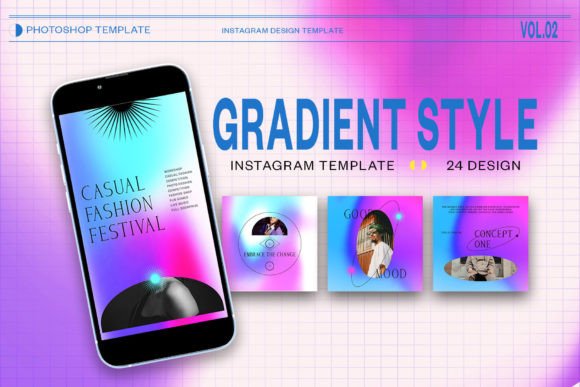
Mastering Social Aesthetics with the Gradient Instagram Template PSD
In the fast-paced world of social media marketing, visual consistency is not just a preference; it is a necessity. Brands and creators alike are constantly searching for ways to streamline their content creation process without sacrificing quality or creativity. This is where a well-designed Gradient Instagram Template PSD becomes an invaluable asset. By leveraging pre-built structures that utilize modern color theory and smart object technology, users can produce professional-grade feed posts and stories in a fraction of the time it takes to design from scratch.
The appeal of gradient designs lies in their versatility. Gradients add depth, movement, and a contemporary feel to static images, making them stand out in crowded feeds. When combined with the flexibility of Photoshop’s native file formats, these templates offer a powerful solution for anyone looking to elevate their digital presence. Whether you are a small business owner managing your own marketing or a social media manager handling multiple accounts, understanding how to effectively utilize these tools can transform your workflow.
The Power of Smart Objects in Content Creation
One of the most critical features of a high-quality Gradient Instagram Template PSD is the integration of Smart Objects. For those unfamiliar with this Photoshop functionality, Smart Objects allow you to place images into a predefined frame while preserving the original image data. This means you can resize, rotate, or apply filters to your inserted photo without degrading its quality or breaking the layout of the template.
The process is designed to be intuitive and efficient. Typically, the workflow involves a few simple steps that anyone can master within minutes. First, you locate the specific image layer within the Photoshop layers panel. You will often see a thumbnail with a small icon indicating it is a Smart Object. To insert your own content, you simply double-click on this layer icon. This action opens a new tab containing the placeholder image.
Once the new tab is open, you can drag and drop your desired photograph or graphic into this window. After positioning your image to your liking, the final step is crucial: you must save the file. By pressing CTRL S (or Command S on Mac), you update the main template. When you return to the original document, you will see your image seamlessly integrated into the gradient design. This "click twice, place, save" method ensures that even users with minimal technical skills can achieve polished results.
Technical Specifications for High-Quality Output
While ease of use is important, the technical foundation of a template determines its professional viability. A premium Gradient Instagram Template PSD is built with specific parameters to ensure compatibility across various devices and printing needs if necessary. Understanding these specifications helps users maximize the potential of their downloads.
- Resolution: The standard resolution for these templates is typically set to 300 dpi (dots per inch). While screen displays usually render at 72 dpi, working at 300 dpi ensures that your images remain crisp and detailed, even if they are zoomed in on high-resolution retina displays. It also provides a safety net should you ever decide to repurpose the content for print materials like flyers or brochures.
- Color Mode: These files are configured in RGB color mode. This is essential because digital screens emit light, and RGB (Red, Green, Blue) is the color model used by monitors, smartphones, and tablets. Using CMYK, which is intended for print, would result in dull and inaccurate colors on social media platforms.
- Dimensions: Versatility is key in modern social media strategies. A comprehensive pack often includes multiple size variations. The standard square post size of 1080 x 1080 px remains a staple for Instagram feeds. However, with the rise of immersive content, including dimensions such as 1920 x 1080 px allows creators to adapt the same design aesthetic for YouTube thumbnails, Facebook covers, or landscape-oriented stories.
Having access to both feed and story formats within a single package ensures brand cohesion. When a user scrolls through their feed and then clicks on a story, the visual transition should feel natural and connected. Consistent use of gradients and layout structures reinforces brand identity and makes your content instantly recognizable.
Customization and Editability
A static template is of limited use if it cannot be adapted to specific messaging needs. One of the standout qualities of a professional Gradient Instagram Template PSD is that all text elements are fully editable. Using the standard Text Tool in Photoshop, users can change headlines, captions, dates, and calls to action with ease.
This level of customization extends beyond just the words themselves. Users can adjust font sizes, colors, and spacing to match their brand guidelines. Because the text layers are separate from the background and image layers, modifying the copy does not disrupt the underlying design. This separation of concerns allows for rapid iteration. For example, a marketing team can create a week’s worth of content by simply swapping out the text and images while keeping the attractive gradient background consistent.
Furthermore, the "Easy to use" nature of these files means that complex design principles are already applied. The designer has already considered balance, contrast, and hierarchy. The user’s job is merely to populate the framework with their unique content. This democratizes high-end design, allowing non-designers to produce work that looks like it came from a professional agency.
Integrating Templates into Modern Workflows
In today’s digital landscape, speed and consistency are paramount. Content calendars are packed, and the demand for fresh visuals is relentless. Relying on a Gradient Instagram Template PSD fits seamlessly into agile marketing workflows. Instead of starting each project with a blank canvas, creators start with a proven structure.
Consider a scenario where a lifestyle blogger wants to announce a new partnership. Using a template with a vibrant gradient background, they can quickly insert a product shot using the Smart Object feature. They then edit the text to highlight the partnership details. The entire process might take ten minutes, compared to an hour or more if designing from scratch. This efficiency allows creators to focus more on strategy and engagement rather than getting bogged down in pixel-pushing.
Moreover, these templates are not limited to Instagram. The dimensions and design principles are applicable across various social platforms. A 1080 x 1080 px image works perfectly for Facebook and LinkedIn posts. The 1920 x 1080 px variant is ideal for Twitter headers or YouTube video backgrounds. By purchasing a versatile pack, users get maximum value from a single resource.
Choosing the Right Template for Your Brand
When selecting a Gradient Instagram Template PSD, there are several factors to consider to ensure it aligns with your brand identity. First, look at the color palette. Gradients can range from soft pastels to bold, neon contrasts. Choose a style that complements your existing logo and brand colors. If your brand is playful and energetic, bright, multi-colored gradients may be appropriate. If your brand is more corporate or minimalist, subtle two-tone gradients might be a better fit.
Second, evaluate the layout complexity. Some templates feature heavy graphical elements, while others are more minimal, focusing primarily on the image and text. Simpler templates often offer more flexibility for different types of content, whereas complex designs might be better suited for specific campaigns or announcements.
Finally, check the organization of the layers. A well-organized PSD file will have clearly labeled layers and groups. This makes navigation easier and reduces the likelihood of accidentally deleting or moving essential design elements. Look for templates that group related items together, such as placing all text layers in one folder and all image placeholders in another.
In conclusion, utilizing a Gradient Instagram Template PSD is a strategic move for anyone serious about their social media presence. It combines aesthetic appeal with functional efficiency, allowing for rapid production of high-quality content. By mastering the use of Smart Objects, understanding technical specifications like 300 dpi and RGB modes, and leveraging fully editable text layers, users can maintain a consistent and professional look across all their digital channels. In an era where visual impact drives engagement, these tools provide the competitive edge needed to stand out.