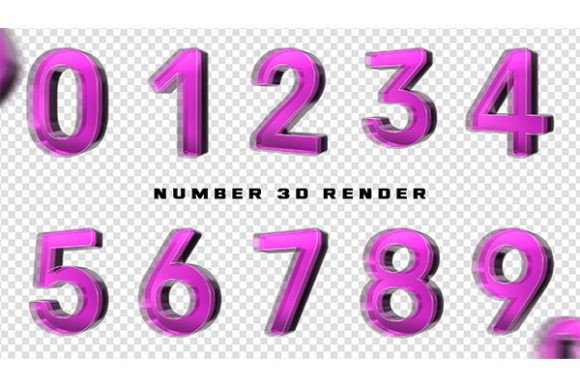
Glass Number 3D: High-Resolution PSD Renders
Visual clarity often defines the success of a digital project. Whether you are designing a luxury brand identity, creating educational materials, or building a social media campaign, the quality of your typography can make or break the viewer’s engagement. This is where Glass Number 3D assets become invaluable. These are not just simple fonts; they are meticulously crafted three-dimensional renders that simulate the physical properties of glass—refraction, reflection, and transparency.
For many creators, the challenge lies in producing these effects from scratch. Rendering realistic glass requires a deep understanding of lighting, material physics, and rendering engines. By utilizing pre-rendered assets, such as a Glass Number 3D – PSD File with a resolution of 150 DPI, you bypass the technical hurdles while maintaining a high-end aesthetic. This approach allows you to focus on composition and messaging rather than getting lost in the complexities of 3D software.
Understanding the Asset: More Than Just a Font
When we discuss Glass Number 3D, we are referring to digital files that have been generated using advanced 3D modeling tools, specifically Cinema 4D. Cinema 4D is renowned for its motion graphics capabilities and its ability to produce photorealistic materials. The "glass" effect is achieved by manipulating indices of refraction and adding subtle imperfections that mimic real-world materials.
The deliverable is typically a PSD (Photoshop Document) file. This format is crucial because it preserves layers, transparency, and editability. A resolution of 150 DPI (dots per inch) strikes a practical balance for most digital applications, including web graphics, social media posts, and standard presentations. While 300 DPI is the standard for high-end print, 150 DPI is often sufficient for screen-based media and offers smaller file sizes, which improves workflow speed without sacrificing visible quality on most devices.
Why Different Creators Choose Pre-Rendered 3D Numbers
The value of a Glass Number 3D asset varies significantly depending on who is using it. A freelance graphic designer has different priorities than a small business owner or an educator. Understanding these perspectives helps you determine if this tool fits your specific needs.
For Professional Designers and Marketers
Professionals often face tight deadlines. Creating a realistic glass render from scratch in Cinema 4D involves setting up scenes, adjusting HDRI lighting, tweaking material nodes, and waiting for render times that can range from minutes to hours per frame. By using a pre-rendered Glass Number 3D – PSD File, professionals can cut production time dramatically.
- Speed: Drag-and-drop functionality allows for rapid prototyping.
- Consistency: Ensures a uniform look across multiple design assets.
- Flexibility: Layered PSDs allow for color grading and blending mode adjustments to match brand guidelines.
For a marketer launching a new product, the ability to quickly generate eye-catching visuals for Instagram or LinkedIn can mean the difference between missing a trend or capitalizing on it. The high-quality render ensures that the brand appears premium and polished.
For Beginners and Hobbyists
If you are new to graphic design, the learning curve of 3D software can be steep. Cinema 4D is powerful, but it requires time to master. For hobbyists or beginners, purchasing or downloading a Glass Number 3D pack provides an immediate way to incorporate advanced visual styles into their work without needing years of training.
This accessibility encourages creativity. Instead of being discouraged by technical failures, beginners can experiment with layout, typography, and color theory. It serves as a learning tool as well; by examining how the layers are structured in the PSD file, novices can learn how professionals handle transparency and lighting effects in post-production.
For Educators and Content Creators
Educators often need to create engaging visual aids for presentations, online courses, or textbooks. Numbers are frequently used in statistics, countdowns, or step-by-step guides. A standard flat font can feel dry and unengaging. Using Glass Number 3D renders adds a layer of sophistication and visual interest that helps retain student attention.
Similarly, bloggers and YouTubers use these assets for thumbnails and header images. The reflective nature of glass catches the eye, increasing click-through rates. The key here is visual hierarchy; the 3D numbers stand out against flat backgrounds, guiding the viewer’s eye to the most important information.
Evaluating Quality and Usability
Not all 3D assets are created equal. When selecting a Glass Number 3D resource, there are several factors to consider to ensure it meets your project requirements.
Resolution and Clarity
The specified resolution of 150 DPI is suitable for most digital uses. However, if you plan to print large-format posters or billboards, you may need to check if higher-resolution versions are available or if the vector data is included. For web use, 150 DPI is generally sharp enough, especially when viewed on standard monitors and mobile devices. Always zoom in to 100% to check for pixelation or artifacts around the edges of the glass.
Layer Organization in PSD Files
A well-structured PSD file is essential for efficiency. Look for files where the numbers are on separate layers. This allows you to rearrange them, change their order, or replace specific digits without affecting the rest of the composition. Additionally, check if the file includes adjustment layers for brightness, contrast, and color balance. This flexibility is vital for integrating the numbers into diverse design contexts.
Realism and Lighting
Since these renders are created with Cinema 4D, the quality of the lighting setup is paramount. Good glass renders should show realistic reflections and refractions. If the glass looks too flat or the reflections are generic, it may detract from the professionalism of your final design. High-quality assets will have nuanced highlights and shadows that suggest depth and volume.
Practical Applications Across Industries
The versatility of Glass Number 3D means it can be applied in various sectors. Here are a few practical examples:
- E-commerce Sales: Use large, glossy 3D numbers to highlight discounts (e.g., "50% OFF") in banner ads. The glass effect conveys a sense of value and premium quality.
- Event Invitations: Digital invitations for anniversaries or corporate galas can feature the year or date in elegant glass typography, adding a touch of sophistication.
- Financial Reports: Freelancers creating infographics for clients can use these numbers to make statistical data more visually appealing and less intimidating.
- Social Media Challenges: Countdowns for product launches or events benefit from the dynamic look of 3D glass, creating anticipation and excitement.
Making the Right Choice for Your Workflow
Deciding whether to use a pre-rendered Glass Number 3D – PSD File depends on your specific goals. If you prioritize speed and ease of use, these assets are an excellent choice. They allow you to achieve a high-end look with minimal effort. If you require complete customization of the 3D shape or animation, learning Cinema 4D might be necessary, but for static or lightly animated projects, pre-rendered files offer the best return on investment.
Consider your long-term needs as well. Investing in a high-quality library of 3D assets can save you hundreds of hours over the course of your career. It allows you to maintain a consistent visual style across multiple projects, which is crucial for building a recognizable brand identity.
In conclusion, Glass Number 3D assets bridge the gap between technical complexity and creative expression. Whether you are a seasoned professional looking to streamline your workflow or a beginner eager to elevate your designs, these renders provide a practical, high-quality solution. By understanding the strengths of PSD files and the capabilities of Cinema 4D renders, you can make informed decisions that enhance your visual communication and engage your audience effectively.