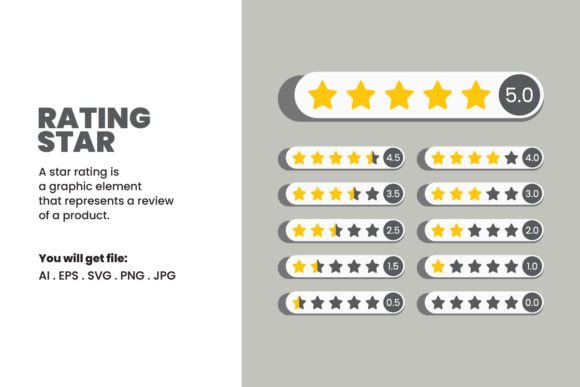
Rating Star Vector Assets for Designers
In the visual language of the modern web and print media, few symbols carry as much immediate weight as the star. It is a universal shorthand for quality, preference, and evaluation. Whether you are building an e-commerce platform, designing a restaurant menu, or creating a presentation for stakeholders, the Rating Star is an essential component of user interface and graphic design. However, not all star assets are created equal. The difference between a pixelated, amateurish icon and a crisp, professionally crafted vector can significantly impact the perceived credibility of your project.
This digital asset pack offers a comprehensive solution for designers who value precision and flexibility. By providing files in multiple formats—including AI, EPS, SVG, JPG, and PNG—this collection ensures that your rating system looks impeccable across every medium, from mobile screens to large-format prints. Understanding how to leverage these files effectively can save hours of work and elevate the final output of your creative endeavors.
Why Format Flexibility Matters in Professional Design
One of the most common frustrations for designers is receiving an asset in the wrong format. A JPEG might look fine on a website but becomes unusable when scaled for a billboard. Conversely, a vector file is ideal for print but might require conversion for certain web frameworks. This collection addresses those pain points by offering a versatile suite of files.
The inclusion of Adobe Illustrator (AI) and EPS files is crucial for professionals who need full control over the design. These vector formats allow you to edit every anchor point, adjust curves, and modify colors without any loss in quality. If your brand guidelines require a specific shade of gold or yellow for your stars, you can make that change instantly. The SVG format is equally important for web developers and UI designers. As a scalable vector graphic, it ensures that your rating stars remain sharp on high-resolution Retina displays and 4K monitors, while keeping file sizes small for faster page loading speeds.
For those who may not have access to vector editing software, the included JPG and PNG files at a massive 5000 x 5000 pixels provide a high-resolution raster alternative. These are perfect for quick mockups, social media graphics, or documents where editing is not required. The transparency support in PNGs allows for seamless integration over colored backgrounds, a feature that is often overlooked but essential for polished design work.
Tailoring the Asset to Your Specific Role
Different creators approach design assets with different priorities. Understanding how this Rating Star pack serves various roles can help you determine if it aligns with your current project needs.
For Web Developers and UI/UX Designers
If you are building a review system for an app or website, consistency is key. You need icons that align perfectly with your typography and layout grid. The SVG files in this pack are ideal because they can be styled directly with CSS. You can change the fill color on hover states or animate the stars using JavaScript without needing to export new images. The clean, minimal design ensures that the stars do not distract from the content but rather enhance the user’s ability to scan and interpret ratings quickly.
For Graphic Designers and Brand Strategists
Designers often face tight deadlines. Creating a custom star icon from scratch might only take ten minutes, but refining it to ensure perfect symmetry and optical balance can take much longer. Using a pre-made, elegant minimal design allows you to focus on the broader composition of your project. Since the files are fully editable in Adobe Illustrator, you can tweak the corner radius or stroke width to match your client’s existing brand identity. This flexibility bridges the gap between convenience and customization.
For Marketers and Small Business Owners
Not everyone has a background in graphic design, yet small business owners and marketers frequently need to create promotional materials. Whether you are designing a flyer highlighting customer testimonials or a social media post showcasing a five-star review, having high-quality assets is vital. The ready-to-use JPG and PNG files mean you can drag and drop these stars into tools like Canva, Photoshop, or even Microsoft Word. The high resolution ensures that even if you resize them for a printed brochure, they will not appear blurry or pixelated.
For Educators and Content Creators
Educators creating course materials or bloggers writing comparison articles often use rating systems to evaluate products or concepts. In these contexts, clarity is paramount. The stark, clean lines of this minimal design ensure that the ratings are easily understood by students or readers. Furthermore, the ability to edit the files means an educator could color-code stars to represent different criteria—for example, using blue stars for "ease of use" and green stars for "value for money."
Evaluating Quality and Usability
When selecting digital assets, several factors should influence your decision. Here is how this Rating Star pack stands up to common evaluation criteria:
- Scalability: With vector sources (AI, EPS, SVG), you can scale the stars from the size of a favicon to the size of a building wrap without losing fidelity. This future-proofs your design.
- Editability: The files are made in Adobe Illustrator, a standard industry tool. This means layers are organized, and paths are clean, making edits straightforward for anyone with basic vector skills.
- Aesthetic Versatility: The elegant minimal design avoids trendy embellishments that might date quickly. A simple, well-proportioned star fits seamlessly into both modern flat designs and more traditional layouts.
- Efficiency: Instead of searching multiple stock sites for the right format, this pack provides everything in one download. This reduces the time spent on asset management and licensing checks.
Practical Applications and Project Integration
To get the most out of these files, consider the context in which they will be used. For digital products, always prioritize the SVG format. It integrates best with codebases and offers the best performance. If you are working on a print project, such as a annual report or packaging, use the AI or EPS files to ensure the highest possible print quality. The CMYK color mode can be adjusted within Illustrator to match your printer’s requirements.
For rapid prototyping, the 5000 x 5000 pixel PNGs are invaluable. They are large enough to be downscaled for any screen density without aliasing issues. This is particularly useful when presenting concepts to clients who need to see how the rating system looks within a realistic mockup.
It is also worth noting the importance of visual hierarchy. When using rating stars, ensure they are sized appropriately relative to the text. A star that is too small may be ignored; one that is too large may dominate the layout. Because these assets are fully editable, you can experiment with different sizes and weights to find the perfect balance for your specific composition.
Important Usage Guidelines
Please remember that this is a DIGITAL download and no physical items will be shipped. Upon purchase, you will receive immediate access to the files. While the assets are designed to be flexible and easy to integrate into your personal or commercial projects, there are strict limitations on redistribution. The actual files may NOT be shared or resold in any form. This means you cannot upload the AI, SVG, or PNG files to a stock website, sell them as part of a template pack, or distribute them freely online. You are purchasing the right to use the design in your end products, not the rights to the source files themselves.
By adhering to these guidelines, you support the creators who invest time in producing high-quality, precise, and versatile design resources. In return, you gain a reliable tool that enhances the professionalism and visual appeal of your work, regardless of your skill level or industry.