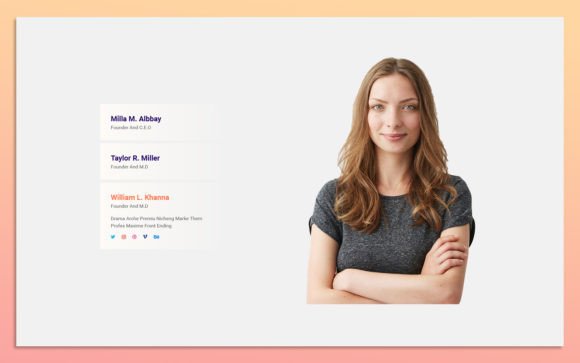
Evaluating the Team Member Widget Design Web-UI Kit for Modern Interface Development
In the landscape of web design, consistency and efficiency are paramount. Developers and designers often face the challenge of creating cohesive team presentation sections that align with broader brand identities without consuming excessive production time. The Team Member Widget Design Web-UI Kit emerges as a specialized resource aimed at streamlining this specific aspect of interface creation. By offering a pre-structured, fully editable foundation, this kit addresses the need for rapid deployment while maintaining high aesthetic standards. Understanding its utility requires a close examination of its features, flexibility, and how it compares to building components from scratch or utilizing rigid, code-heavy alternatives.
Core Features and Design Philosophy
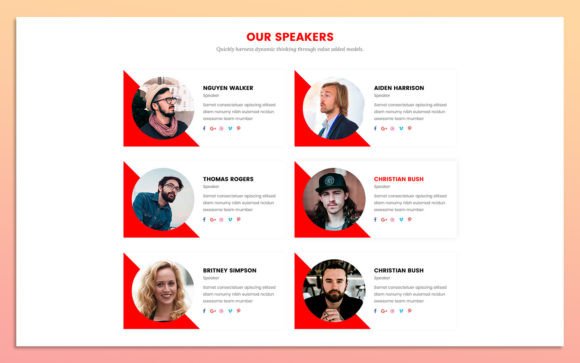
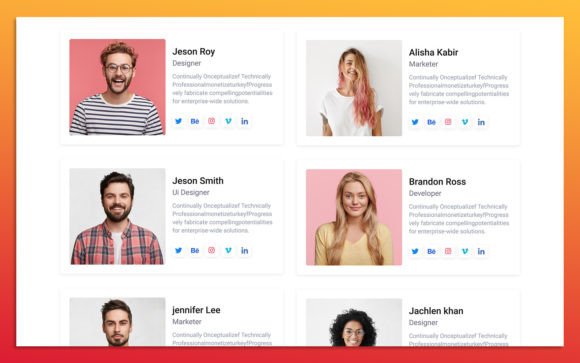
The primary appeal of the Team Member Widget Design Web-UI Kit lies in its balance between simplicity and modernity. The design ethos is clean, avoiding unnecessary clutter that can distract users from the core information: the team members themselves. This minimalist approach ensures that the widget integrates seamlessly into various website layouts, whether for corporate portfolios, creative agencies, or startup landing pages.
A critical technical advantage is the use of fully organized layers within the source file. For professionals working in Adobe Photoshop, layer organization is not merely a convenience; it is a necessity for efficient workflow. Disorganized files can lead to hours of wasted time searching for specific elements. This kit prioritizes logical grouping, allowing designers to isolate text, images, icons, and background shapes effortlessly. Furthermore, the inclusion of Google Fonts ensures typography compatibility across different browsers and devices, reducing the friction often associated with custom font implementation.
The scalability of the elements is another significant factor. Because the components are vector-based or high-resolution raster assets designed for scalability, they remain crisp regardless of the display size. This 100% scalability ensures that the widget looks professional on both high-density mobile screens and large desktop monitors, a requirement for responsive web design standards.
Customization Flexibility and Ease of Use
One of the most frequent concerns when adopting a UI template is the difficulty of customization. Many templates offer beautiful defaults but become cumbersome when deviations from the original design are required. The Team Member Widget Design Web-UI Kit distinguishes itself by emphasizing ease of modification. Users can easily change color styles to match existing brand guidelines. This is achieved through intuitive layer structures where color overlays and shape fills are separated from content, allowing for global or individual adjustments without disrupting the layout integrity.
Image replacement is equally straightforward. In team sections, photography varies widely in aspect ratio and lighting. A robust UI kit must accommodate these variations without breaking the design grid. This template allows for simple image swapping, ensuring that headshots or full-body photos fit neatly within the designated frames. For non-designers or developers with limited graphic design experience, this level of accessibility reduces the dependency on specialized design resources, enabling faster iteration cycles.
Comparative Analysis: UI Kits vs. Custom Coding
When evaluating resources for web development, professionals often weigh the benefits of using a design kit against custom coding from scratch. Each approach has distinct tradeoffs regarding time, cost, and final output quality.
- Time Efficiency: Building a team widget from scratch involves conceptualizing the layout, selecting typography, choosing color palettes, and coding the HTML/CSS structure. The Team Member Widget Design Web-UI Kit eliminates the initial design phase, providing a ready-made visual framework. This can reduce design time by several hours per project.
- Consistency: Custom designs may suffer from inconsistency if multiple designers work on different parts of a site. A UI kit ensures that every team member card follows the same structural rules, spacing, and typographic hierarchy, promoting visual harmony.
- Learning Curve: While coding offers ultimate control, it requires proficiency in front-end technologies. Using a Photoshop-based UI kit requires graphic design skills but lowers the barrier for creating visually polished assets before handing them off to developers. It serves as a precise visual specification, reducing miscommunication between design and development teams.
However, it is important to note that a UI kit is a design asset, not a code repository. Users must still translate the visual design into functional code. For those seeking immediate drag-and-drop functionality in a website builder, a coded component or plugin might be more appropriate. Yet, for bespoke designs where unique branding is essential, starting with a flexible PSD template offers greater creative freedom than rigid pre-coded widgets.
Ideal Use Cases and Limitations
Understanding when to utilize the Team Member Widget Design Web-UI Kit helps in making an informed decision. This resource is particularly well-suited for:
- Agency Portfolios: Creative firms often need to showcase their team with a distinct visual style that reflects their brand personality. The customizable nature of this kit allows for quick adaptation to diverse brand identities.
- Startup Landing Pages: Startups frequently iterate on their messaging and visual presentation. A modular UI kit enables rapid updates to team sections as the company grows or pivots, without requiring a complete redesign.
- Corporate "About Us" Pages: Larger organizations require clean, professional presentations of leadership teams. The simple, modern design of this kit aligns well with corporate aesthetics, providing a trustworthy and organized appearance.
Despite its strengths, there are limitations to consider. Since the source format is Photoshop, users unfamiliar with this software may face a learning curve. Additionally, while the design is responsive-friendly in concept, the actual responsiveness depends on how the developer implements the CSS media queries based on the design mockup. The kit provides the visual blueprint, not the responsive behavior itself. Therefore, it is best utilized by teams that have both design and development capabilities, or by designers who collaborate closely with developers.
Decision Factors for Professionals
Choosing the right design resource involves evaluating several key factors. First, consider the project timeline. If deadlines are tight, leveraging a pre-designed UI kit like the Team Member Widget Design Web-UI Kit can accelerate the delivery process significantly. Second, assess the brand uniqueness. If the project requires a highly unconventional layout, a standard kit might require extensive modification, potentially negating time savings. However, for most standard web applications, the flexibility offered by this kit’s editable layers and scalable elements provides a solid middle ground.
Another crucial consideration is maintenance and scalability. A well-organized PSD file ensures that future updates—such as adding new team members or changing seasonal themes—are manageable. Poorly structured templates can become liabilities as projects evolve. The emphasis on organized layers in this kit supports long-term maintainability, making it a sustainable choice for ongoing web projects.
Finally, evaluate the skill set of your team. If your workflow relies heavily on Adobe Creative Cloud, integrating a Photoshop-based UI kit is seamless. If your team prefers sketching tools or Figma, you would need to convert the assets, which adds an extra step. For Photoshop-centric workflows, this kit integrates naturally into the existing pipeline.
Conclusion
The Team Member Widget Design Web-UI Kit represents a practical solution for professionals seeking to enhance the visual appeal of their team sections without sacrificing efficiency. Its combination of modern design, full editability, and organized structure makes it a valuable asset in the toolkit of web designers and developers. By understanding its capabilities and limitations, users can effectively determine whether it aligns with their specific project needs. Whether for a small business website or a large corporate portal, this kit offers a reliable foundation for creating professional, engaging, and consistent team presentations. As with any design resource, the key to success lies in thoughtful customization and seamless integration into the broader user experience strategy.